How to unlock and use Hydra Worm in Sandworm Playground
Hydra Worm unlocks at level 50. Equip it in WORMS and switch into worm form. On mobile, the large red button is TRIPLE BITE and the smaller yellow TRIPLE BREATH button sits above and left of it. Hydra’s three heads can breathe fire, frost and venom together.
Updated 2026-11-22 · Roblox · Frozen Wastes update
Equip Hydra and land a hit
Unlock and equip Hydra Worm at level 50
Earn XP until your level badge reaches 50, then open WORMS and find Hydra Worm. Choose EQUIP when it appears. Tap the WORM control if you are still in human form.
Use Triple Bite up close
Line up a nearby character in front of Hydra’s three heads. Use the large red TRIPLE BITE button when your heads reach the target. Look for a CHOMP hit message or XP as the worm passes through.
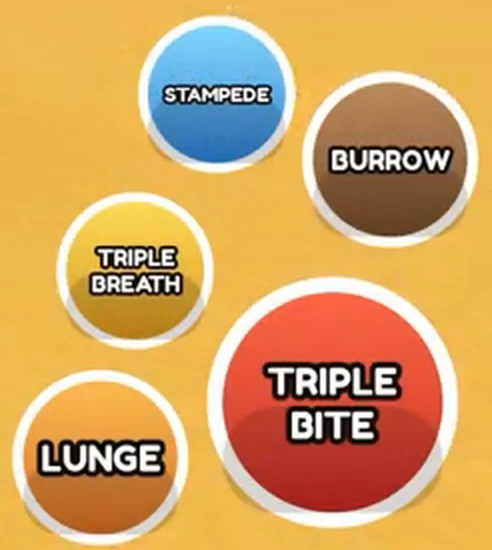
TRIPLE BITE is the large lower-right button. Look above and left of it for the yellow TRIPLE BREATH button. Try Triple Breath with prey ahead of the heads
Turn the three heads toward nearby prey and use TRIPLE BREATH. The three heads produce fire, frost and venom effects. In the desert footage, the player’s Hydra shows BURNED and MELTED hit messages during elemental effects. Check for a hit message or XP after the breath.
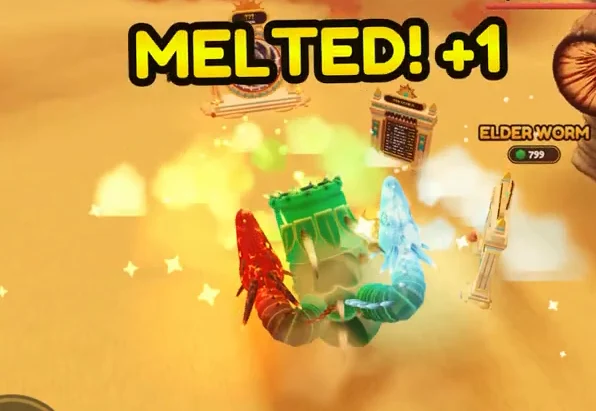
MELTED! +1 is one piece of feedback to look for during the breath attack.
Read the attack feedback
Look for CHOMP, BURNED, MELTED or an XP popup. A successful hit can show different text depending on how the target was struck.
If Triple Bite is missing
Check that the Hydra Worm card says EQUIPPED and that the form button says HUMAN. If you still see a locked Hydra card, compare your current level against 50.
Next steps
Worm Unlocks Browse all guidesSources
- Official Hydra Worm pass description and level 50 requirement
- Official level 50 badge names Hydra Worm
- TECHNOBLADE NEVER DIES · Mobile Hydra controls and CHOMP feedback (0:01–0:07)
- TECHNOBLADE NEVER DIES · Triple Breath activates and MELTED feedback appears (0:18–0:20)
- OreBob · Hydra elemental effects and FROZEN feedback (10:45–10:50)